


MSC for Me
4.71.46K Reviews
App Specs
- Version
- 5.5.0
- Updated On
- License
- Free
- Downloads
- 1,000,000+
- Developer
- MSC Cruises S.A.
- Categories
- Travel & Local
- Platform
- Android, iOS
Screenshots
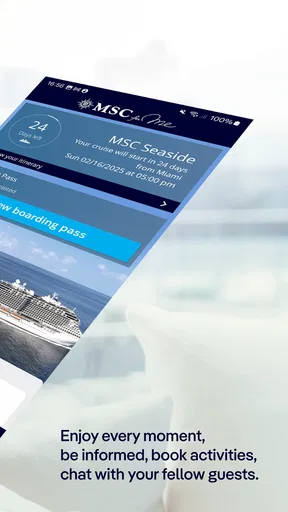
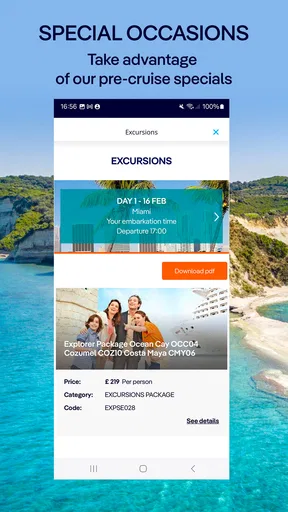
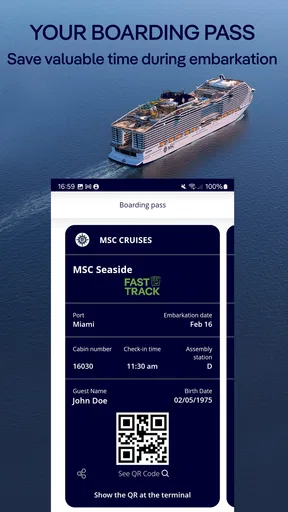
 Analysis by AppCompare
If you're planning a cruise with MSC Cruises, the MSC for Me app is about to become your best friend. This app is like having a personal concierge right in your pocket, helping you make the most of your time on board. Whether you're a first-time cruiser or a seasoned sea lover, this app offers something for everyone.
Readability and finding your way around
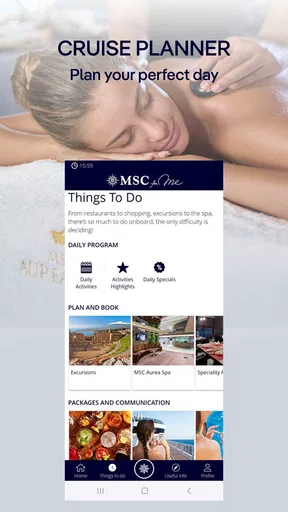
A cruise involves plenty of small decisions: what is happening today, where to go next, and how to get there. The app brings practical planning tools together, including a schedule of activities, dining reservations, shore excursion bookings, and an interactive ship map. I find that combination more useful than relying on a printed daily programme alone, especially when plans change or I want to check several options before choosing.
The map has a particularly clear purpose: it helps turn a large ship from a maze of corridors into a place you can explore with more confidence. I would use it before setting off for an unfamiliar venue, rather than waiting until I am already wandering around. That small habit can be helpful when travelling with children, meeting friends, or trying to arrive on time for a reservation.
There is a practical distinction between this and a general travel app. A maps app can help with destinations ashore, but it is not built around a particular ship’s onboard layout and activities. The MSC app’s value is its focus on the cruise itself; I would still keep a conventional map or navigation tool available for exploring ports.
Motor and sensory considerations
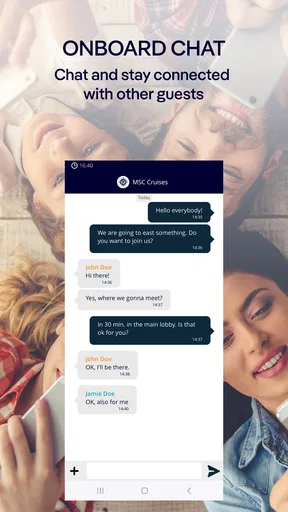
Having schedules and reservations on a phone can reduce the need to repeatedly walk to information points or carry paper notes. That can make planning easier for someone who prefers to check details privately and at their own pace. The chat feature can also help a group coordinate without having to cross the ship just to pass along a simple message.
At the same time, a phone-based experience asks you to read a screen, tap controls, and keep the device accessible. Those steps may be tiring or inconvenient for people with limited dexterity, low vision, or sensitivity to screen use. I would treat the app as a useful companion rather than the only way to get essential information, and ask the crew about other ways to access help or updates if using a phone is difficult.
For a sensory-conscious routine, I would check the day’s schedule in a quiet moment and choose activities in advance, instead of relying on repeated last-minute browsing in a busy space. The schedule can help you see what is planned, but it does not replace checking the actual setting and deciding whether the noise, crowd, or pace will suit you. That distinction matters: digital planning can make choices easier without making every onboard environment comfortable for everyone.
Worth Reading Before You Choose

Flipboard Shows What News Apps Must Do Beyond the Feed

Switching to Android Auto Means Rethinking Your Driving Routine

Google Calendar Makes a Crowded Week Easier to Manage

Ludo King Makes the Most of the Minutes Between Plans

Baby Panda World Brings Quick Play to Modern Phones, but Its Game Library Feels Busy

ESPN’s Live Game View Makes Following Close Games Easier
Using it in real cruise situations
Imagine arriving on board with a family group and several different plans for the afternoon. I would first use the schedule to agree on one activity, check the ship map so everyone knows the destination, and use chat to coordinate if someone wants to do something else. Later, the same routine can help with dinner or an excursion booking. The benefit is not that the app makes the ship effortless; it is that it gives the group a shared place to check plans.
Before sailing, it makes sense to install the app and get familiar with its setup while you have time and a reliable connection. The setup uses a cruise booking number, so I would have that information handy rather than trying to find it during a busy boarding period. Once on board, I would check which functions are relevant to my trip and avoid assuming that every option will be useful to every traveller.
The app is free, is developed by MSC Cruises S.A., and sits in the travel-and-local category. It has an average rating of 4.6 from around 46,000 ratings, with more than a million installs. It is rated for everyone, and version 5.4.14 requires Android 10 or later. Those details make it straightforward to assess whether it fits your phone, but the more important question is whether you are sailing with MSC: its onboard tools are most relevant to that specific cruise.
Where it helps—and where it does not
The strongest reason to use it is to keep cruise-specific tasks in one place: checking the day’s activities, arranging dining or shore excursions, finding venues, and keeping in touch with travelling companions. That is a more focused approach than juggling a paper schedule, messages in a separate app, and handwritten notes. The trade-off is that this convenience depends on being comfortable using a phone as part of the trip.
For anyone comparing it with ordinary travel planners, the difference is scope. General itinerary apps are better suited to organising flights, hotels, and plans across several companies. This one is designed around time aboard an MSC ship, so it can be a better fit for onboard plans but is not a complete organiser for an entire holiday. I would use it alongside whichever tools I already rely on for travel documents and port-day directions, rather than expecting one app to cover everything.
It is also not the right choice for someone who is not travelling with MSC or who strongly prefers to keep their holiday offline and phone-free. Even on an MSC trip, a companion who does not want to manage plans on a screen may be happier checking details with a travel partner or asking staff. If accessibility needs affect reading or touch input, it is sensible to test the app before departure and make a backup plan for accessing important information.
Staying connected and making plans
The onboard chat is useful when a group splits up, particularly when people want to meet later without repeatedly searching for one another. I would agree on a simple routine—such as checking messages before moving to a new area—rather than expecting everyone to watch their phone constantly. That keeps the feature helpful without letting notifications take over the holiday.
The app also supports linking with social media, which may suit travellers who like sharing moments as they happen. I would still think about when I want to post and when I would rather put the phone away. A cruise can be busy, and the point of having a schedule and map at hand is to make it easier to enjoy the day, not to turn every activity into a screen check.
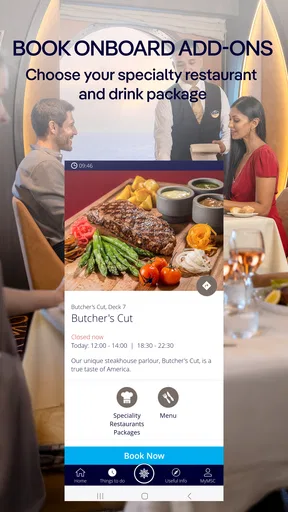
Dining and excursion bookings are another reason to look ahead. If a group has different preferences, I would compare options together before making a choice, then check the plan again later so everyone knows what was decided. This is a small but useful workflow: using the app to settle the logistics early can prevent avoidable confusion when the group is already on the move.
Personal choices and realistic expectations
The app includes ways to set preferences for dining and activities and offers recommendations based on what you like. I would treat those suggestions as prompts, not as a guarantee that every recommendation will suit my mood or schedule. A preference setting can save browsing time, but it is still worth checking the details of an activity before committing to it.
Spa appointments and special offers are available through the app as well. For someone who already knows they want a treatment, being able to look at appointments while planning the day can be convenient. If you prefer to decide spontaneously, there is less reason to spend time browsing those options in advance. I would use these features selectively, so the app remains a helper rather than another list of tasks to complete.
It also provides health and safety updates, which can be reassuring when you want to keep track of onboard guidance. I would check the app for relevant information, while remembering that a phone screen is not a substitute for asking crew members when a situation needs a direct answer. For something urgent or unclear, speaking to staff is the more sensible route.
Convenience, with a few trade-offs
The app integrates with MSC’s wristband technology for contactless payments and room access. That can make moving around the ship more convenient for people using the wristband, but I would not assume that everyone in a travelling party will use the same method. Before relying on a particular routine, make sure each person knows how they will handle room access and purchases.
More broadly, the phone is useful as a planning centre, but it is also a device you may want to conserve, put away, or leave behind for part of the day. I would check the schedule and map before heading out, then use the app again only when a genuine question comes up. This approach reduces needless screen time and gives you a practical fallback if you would rather focus on the ship or the view.
One point worth keeping in mind is that the app serves a specific cruise context. Its usefulness can vary with the way you travel: a first-time cruiser may appreciate having the map and schedule close at hand, while an experienced guest who already knows the ship may mainly use it for bookings or messages. A travelling companion who does not need those tools can still enjoy the trip without making the app the centre of their plans.
Getting Started with MSC for Me
First things first, downloading the app is as easy as pie. Available on both Android and iOS, you just need to head over to the Google Play Store or the Apple App Store. Once downloaded, the setup process is pretty straightforward. Just sign in with your cruise booking number, and you're good to go!
Features That Make Life on Board a Breeze
One of the standout features of the app is its ability to serve as a digital planner. You can browse through daily schedules, make reservations for dining, and even book shore excursions. It's like having a personal assistant who never sleeps! The app also provides real-time updates on activities happening around the ship, so you'll never miss out on the fun.
Another cool feature is the interactive ship map. It's incredibly handy, especially if you're navigating one of MSC's larger ships. It helps you find your way around with ease, ensuring you spend more time enjoying the ship rather than getting lost in it.
Stay Connected with Friends and Family
Staying connected on a cruise can be tricky, but the app offers a nifty chat feature. You can communicate with friends and family on board without needing a Wi-Fi package. This is a game-changer for keeping in touch, especially if you're traveling with a group.
Plus, the app allows you to link up with social media, so you can share those stunning sunset photos and unforgettable moments instantly. It's all about staying connected, both on and off the ship.
Personalized Experiences at Your Fingertips
Customization is key with this app. You can personalize your experience by setting preferences for dining and activities. The app learns your likes and dislikes, offering recommendations tailored just for you. It's like having a cruise tailored to your interests, making every moment on board uniquely yours.
For those who love a little pampering, the app also lets you book spa appointments and check out special offers. It’s all about enhancing your cruise experience, taking relaxation and enjoyment to the next level.
Safety and Convenience Rolled Into One
With the world as it is today, safety is paramount. The app provides health and safety updates, ensuring you're always informed about the latest protocols. It's comforting to know that the app has your back when it comes to staying safe.
Moreover, the app integrates with MSC's wristband technology, allowing for contactless payments and easy room access. It’s the epitome of convenience, streamlining your cruise experience.
A more inclusive way to plan a cruise
My overall view is that MSC for Me can make the practical side of an MSC cruise easier to manage, particularly for people who benefit from seeing plans and directions on a personal screen. It is most valuable when you use it for a clear purpose—finding a venue, checking what is happening, or coordinating with your group—rather than expecting it to remove every source of uncertainty.
Its inclusive value is real but conditional. Having information available on a phone can give some travellers more control over when and how they check it. For others, screen reading, touch interactions, or the need to keep a device nearby may add effort. I would recommend trying the app before the trip, choosing only the features that genuinely help, and keeping a non-phone way to ask for assistance in mind.
Wrapping It Up
In conclusion, the app is an essential tool for anyone cruising with MSC. It’s packed with features that enhance every aspect of your journey, from planning and navigation to staying connected and safe. It's like having a personal cruise director who knows exactly what you want.
So, if you're setting sail with MSC, don't forget to download this app before you board. Trust me, once you start using it, you'll wonder how you ever cruised without it. Bon voyage!
Pros
- User-friendly interface enhances navigation.
- Real-time itinerary updates keep users informed.
- Offline access for essential features.
- Personalized daily programs and recommendations.
- Integrated booking for excursions and services.
Cons
- Limited language options available.
- Occasional syncing issues with onboard systems.
- Requires constant updates for full functionality.
- Some features need an onboard internet connection.
- May drain battery quickly when used extensively.
FAQs for MSC for Me
What is MSC for Me and what features does it offer?
MSC for Me is a comprehensive app designed to enhance your cruise experience with MSC Cruises. It offers features like real-time itinerary updates, onboard activities scheduling, restaurant reservations, and access to interactive maps of the ship. It also provides digital assistance for a more personalized cruise experience.
Is MSC for Me available on both Android and iOS devices?
Yes, MSC for Me is available for download on both Android and iOS platforms. You can find it on the Google Play Store for Android devices and the Apple App Store for iOS devices. Ensure that your device meets the application’s compatibility requirements for optimal performance.
Do I need an internet connection to use MSC for Me on board?
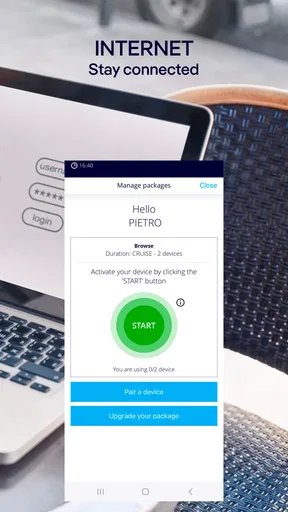
While some features of MSC for Me require an internet connection, the app is designed to work with the ship’s onboard Wi-Fi. You can access most of its functionalities without incurring extra charges. However, certain content and updates may require a connection to the internet.
How secure is my personal information on MSC for Me?
MSC Cruises prioritizes passenger privacy and data security. MSC for Me uses encryption and other security measures to protect your personal information. It's important to ensure that you're using the latest version of the app to benefit from the most up-to-date security features.
Can I use MSC for Me to communicate with other passengers?
Yes, MSC for Me includes a chat feature that allows you to communicate with other passengers onboard. This is particularly useful for coordinating activities or staying in touch with family and friends during the cruise. Note that both parties need to have the app installed for this feature to work.


